
3D warehouse operation center
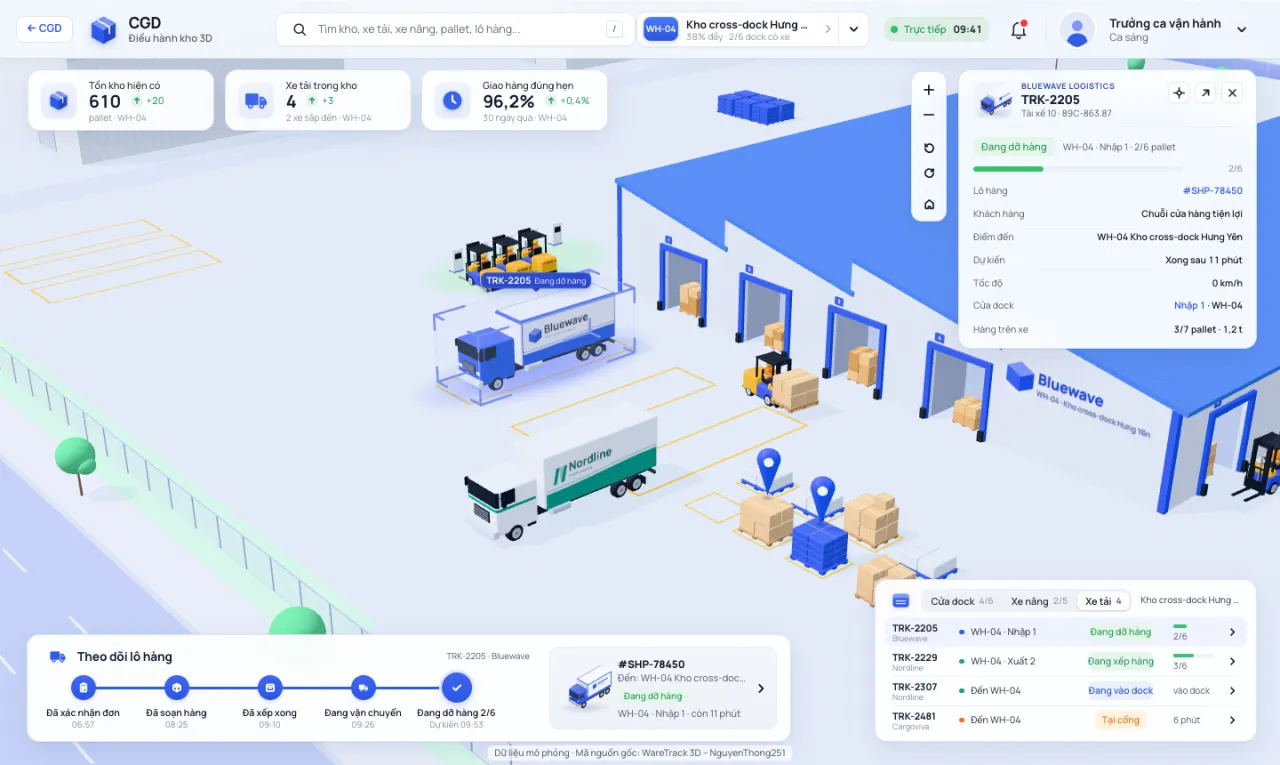
One operating screen for the entire network of five warehouses: trucks entering the gate, backing up to the dock door, forklifts loading pallets onto the truck, inventory and on-time delivery rate updated according to the simulation clock.
 Open the operations center →
Open full screen, run on a browser with WebGL. Desktop for the most complete experience; You can watch it on your phone, but the panels will obscure the scene.
What can you do in it?
- Hover or touch entering trucks, forklifts, pallets, dock doors, charging stations, warehouse buildings: shows status label. Click to open the details panel on the right.
- Select warehouse in the top bar, or "Whole network" to see all five warehouses. The camera flies over the city to the selected warehouse.
- Fleet table (lower right corner): tab Dock doors · Forklifts · Trucks. Click a line to direct the camera to the correct object; For oncoming trucks, a path is drawn on the road to the correct dock door.
- Shipment tracking (lower left corner): milestones from order confirmation, order preparation, vehicle loading, transportation to delivery, with estimated time.
- Quick search: press key
/Then type in the vehicle code (TRK-2205), forklift code (FL-01) or product name, you can also type without accents. - Drag the left mouse button to move the map, right mouse button to rotate, scroll to zoom in; or use the + − ⟲ ⟳ ⌂ buttons.
Read this screen like an operator, and like a designer
- Dock doors are the scarcest resource. Cars standing "At the gate" waiting for the door to open are costs: driver waiting, queue waiting, delivery schedule sliding behind. The number of doors and parking depth are design decisions that are difficult to correct after construction.
- Forklift attached to each truck. The "2/6 pallet" progress bar indicates whether the bottleneck is at loading or at the door.
- Inventory, dock door and on-time must look at the same time. Full warehouses that are close to capacity often have pallets waiting to be stored, and trucks are shipped out more slowly.
- Want to calculate the number of dock doors and forklifts yourself for one shift? Play 3D warehouse: one shipping shift.
⚖️ All warehouses, car brands, customers, license plates and data in the simulation are fictitious and do not reflect any business. Vietnamese version from source code project WareTrack 3D by author NguyenThong251, used with permission of the author; Built with Three.js library (MIT license), Manrope font (OFL license).
Have real project parameters? Send them to CGD and get feedback on the design scope
This simulation stops at the principle. For a specific project, CGD builds the model on real operating data and floor plan drawings.
Submit a consultation request